Security at CostCompass
CostCompass holds something dangerous on your behalf: API keys and OAuth credentials for the AI and compute providers you use. A single leaked Anthropic key can run a five-figure bill before you notice. This page explains how we handle them, including where we made trade-offs.
It is written for engineers and security-minded readers who want to know whether the design holds up. Where we call something safe, we try to show why.
TL;DR
- Your API keys are encrypted in your browser, with a password only you know. We store the locked copy. We cannot unlock it, and we can't recover your password.
- Our main server never sees your keys. When you refresh, your browser hands the key to a small, separate service (the broker). It calls only known providers, then throws the key away.
- Your usage data can't be altered on the way in. The broker signs every reply, and our server rejects anything unsigned.
- We list our trade-offs openly. See "Where we made compromises" below.
Threat model
What we defend against
- A compromise of our App Server. An attacker who breaks into our backend gets the encrypted vault blob, not your keys. They still need your password.
- A compromise of our database. Same result: the vault column is a JWE ciphertext.
- A passive network observer. All traffic is HTTPS. The vault password never leaves your device.
- A stolen session cookie. Grants application access (read your usage data, change settings), not vault access. The vault password is required to decrypt and is never sent to a server. The cookie is also hard to steal or misuse: it is
HttpOnly(page scripts cannot read it),Secure(sent only over HTTPS), andSameSite=Lax, and every request that changes something must also carry a separate CSRF token that another site cannot forge. - A malicious or compromised browser tab on a different origin. Cross-origin scripts cannot read our cookies or call our worker.
- A compromised browser injecting forged usage data. The broker signs each provider response; the App Server verifies the signature before ingest. Your browser relays the response but cannot fabricate, alter, or replay usage data. Signing proves the data came through our broker unchanged; it cannot prove the provider reported it correctly.
What we do not defend against
- Malware, malicious browser extensions, or a compromised browser binary on your device. They run inside the same process boundary as our code and can observe whatever the page can.
- Physical access to your computer while the vault is unlocked.
- You forgetting your vault password without an export on hand. There is no recovery path; see below.
- A targeted attacker with live memory-read access on our broker host during one of your active refreshes. The design limits what such an attacker can take to what is in flight at that moment. See §4.
- A tampered version of our own web app. Your browser runs the code we send it. If that code were ever changed, through a break-in to how we build or serve the site or a bad change of our own, it could capture your vault password as you type it. See §6.
- Misuse by a provider that you have authorized via OAuth. Once Google, GitHub, or another OAuth identity provider holds an access token for your account, what they do with it is between you and them.
The trust boundaries
The system has four distinct trust zones, and each one knows a different subset of your secrets. The broker tier is two kinds of service: the forwarding broker, and one oauth-broker per provider.


Your browser holds the password (in RAM only) and the derived encryption key (inside a Web Worker, as a non-extractable WebCrypto object that JavaScript cannot read out). It composes outbound HTTP requests with your provider key in the Authorization header.
The App Server stores the encrypted vault, your account, and your usage history. It never sees your password or a decrypted key. It does see provider response bodies after the broker validates them, because that is the data we are aggregating for you.
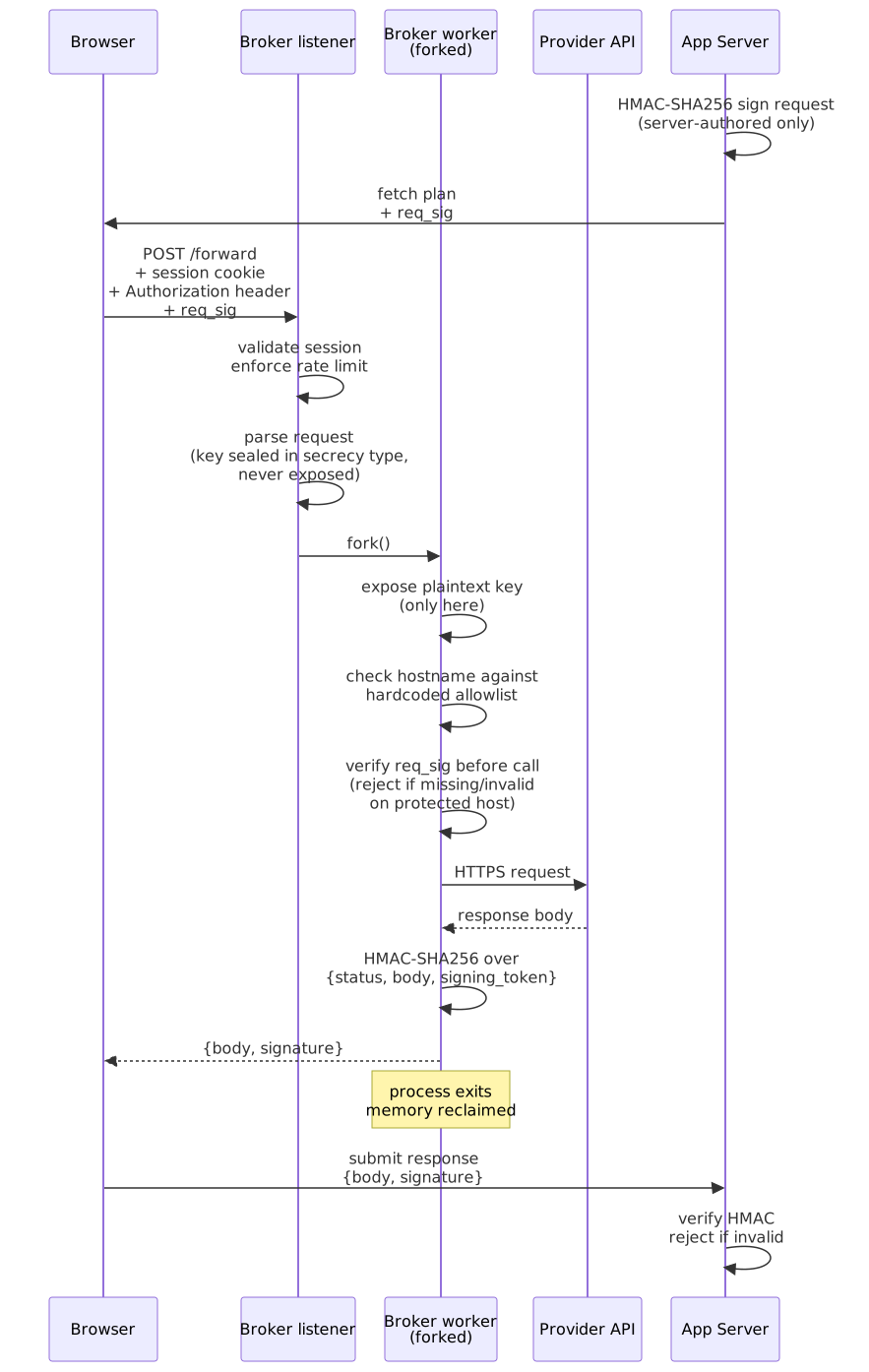
The forwarding broker's listener validates your session, enforces rate limits, and forks a worker. It reads only the outside of the request: your CostCompass session and the route. The part that carries your provider key waits unread until the worker reads it. The plaintext key exists only inside that worker, and the OS reclaims the worker's memory when it exits.
The forwarding broker's worker reads your key and the destination, validates the destination hostname against a fixed allowlist, verifies the App Server's signature on any request we mark as server-authored (rejecting it before the call if the signature is missing or wrong), makes the HTTPS call, signs the response with HMAC-SHA256, returns it, and exits. It keeps no connection pool and no state.
The oauth-broker is a sibling service that handles the OAuth handshake for confidential-client providers (Google, Cloudflare, and GitHub App mode). It runs as a separate copy per provider: the Google copy holds only Google's client_id/client_secret, the GitHub copy only GitHub's (plus the App's RS256 private key), and so on. A break-in to one does not hand over another provider's secrets, and each copy signs with its own key, so one cannot vouch for another. Like the forwarding broker, its long-running process only looks at the outside of each request (who you are, which route) and hands the request to a worker. Only the worker reads your tokens or processes a provider's reply. The App Server has no OAuth code paths and never holds a provider OAuth credential. §1 covers what this solves and what it leaves open.
How the vault works
Your vault is a JWE blob, a standard format defined by RFC 7516. The math is standard. What matters is that we can store it on our server and still not read it.
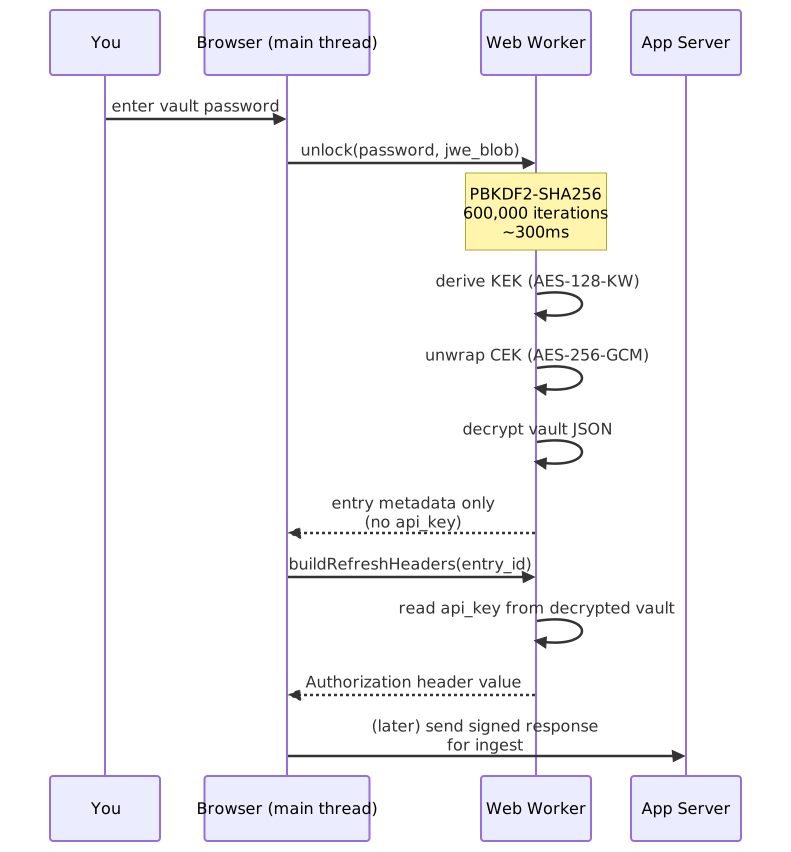
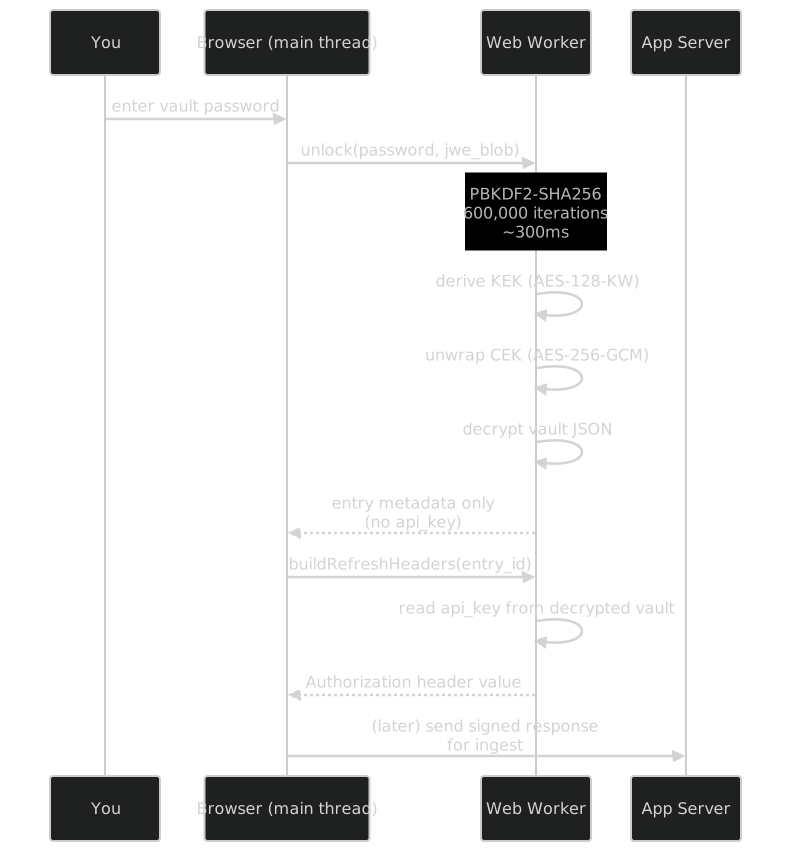
In short: your password is run through PBKDF2-SHA256 at 600,000 iterations (the OWASP 2024 baseline) to derive a key-encryption key. That KEK unwraps a fresh 256-bit AES-256-GCM content-encryption key, which decrypts the vault JSON. A new content-encryption key and a new 12-byte nonce are generated every time we encrypt, so even though we hold the password in RAM across multiple saves, we never reuse a GCM nonce.
Two things matter more than the parameters:
The decrypted key is non-extractable. When the Web Worker imports the unwrapped CEK into the WebCrypto API, it does so with extractable: false. This means the raw key bytes never become available to JavaScript, ours or anyone else's. That protects less than it sounds. Code running in the page, including a script an attacker managed to inject (XSS), cannot read the key out. It can still ask the worker to use the key, and it can catch a provider key during the brief moment a refresh builds its request header (see below). The worker limits what such a script can take; it does not stop it.
The vault is a separate JS context. All decryption happens in a Web Worker. The main thread receives entry metadata (provider, label, instance key) but never the api_key field by default. A plaintext provider key reaches the main thread only at moments you trigger: the brief construction of an HTTP Authorization header for an outbound refresh, and the two explicit, user-initiated actions of revealing a key (the eye toggle in the edit form) or exporting your vault. Neither runs in the background. Each needs a deliberate action, and the export asks you to confirm, then zeroes its buffer once the file is built.
"Remember me" caveat. If you opt in, the unwrapped CEK is cached in IndexedDB as a non-extractable WebCrypto handle for up to 14 days. The raw bytes still cannot be read out, but anyone with access to your unlocked browser profile can use the cached key. Treat that checkbox the same way you would "remember this device" on any other site.
How the broker works
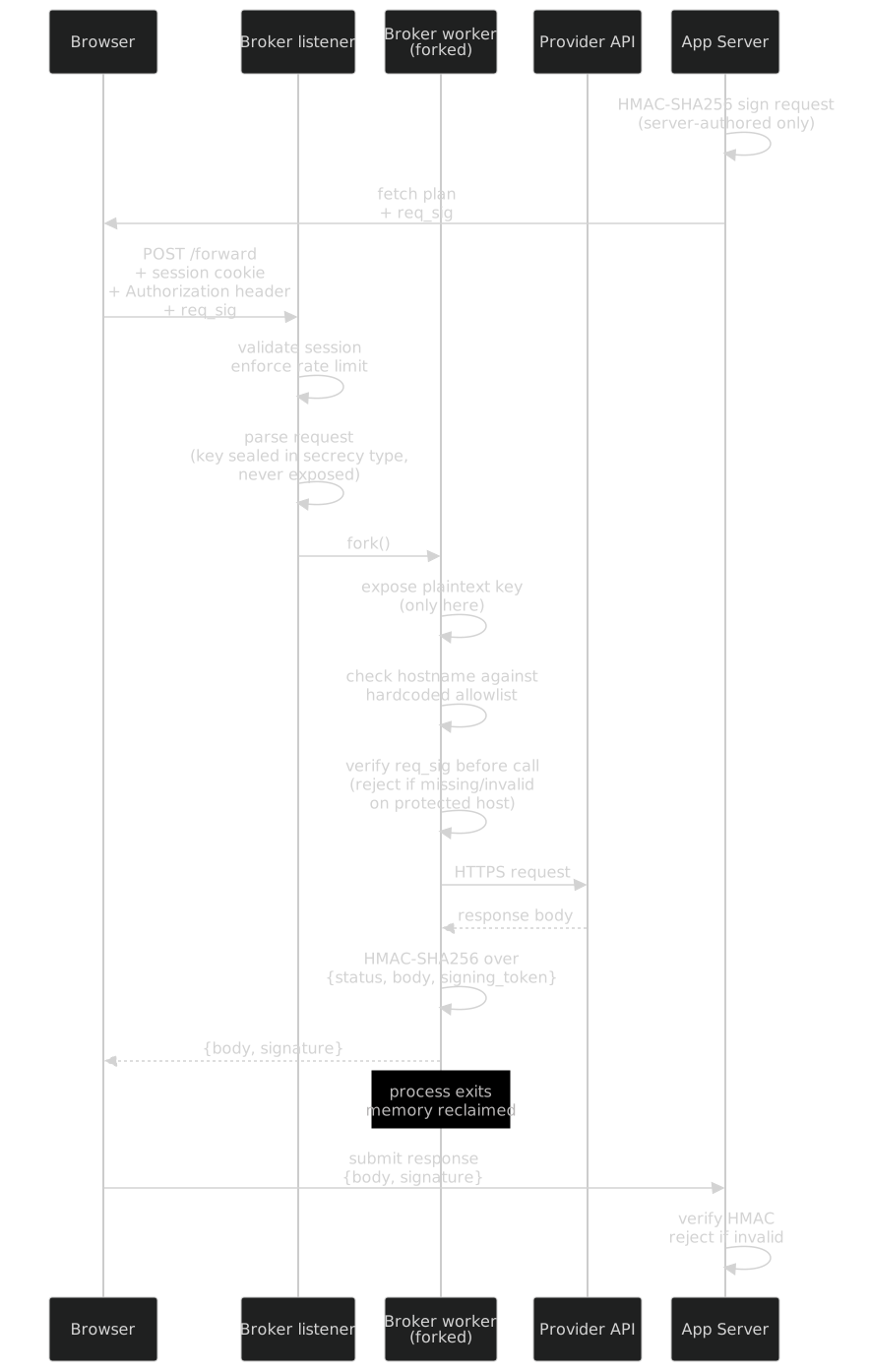
The broker is a small service whose job is to forward HTTPS requests to a fixed set of provider hostnames and sign the responses. It is the only one of our servers that ever holds a plaintext provider key, and it holds each one for tens of milliseconds, inside a worker process.
The hostname allowlist comes from one place per provider. Each provider's plugin declares the hostnames it may reach in its own small source file. A generator builds the forwarding broker's allowlist from those files every time the stack starts, so a hand-edit to the deployed list does not survive a restart; the broker reads it from a read-only config file. (The oauth-broker's list is shorter and fixed in its own config: only the OAuth and account-listing endpoints of its providers.) Matching is exact and ignores case. There are no wildcards and no subdomain matching. Adding a provider hostname means changing that provider's code and redeploying. evil.api.anthropic.com.attacker.com does not match api.anthropic.com, and there are tests for that.
The listener does not read the key. The listener reads only the request's headers — who you are and which route — to check your session and rate limit. The body, which carries your provider key, stays in the connection until the per-request forked worker reads it. Finding where the headers end can pull a few body bytes into a scratch buffer, which the listener wipes before it does anything else. The plaintext key is read in full only inside the worker, whose whole address space the OS reclaims on exit.
The type system keeps keys out of logs. Secrets are held in wrapper types, built on the Rust secrecy crate, that cannot be printed as text: formatting one for display is a compile error, and the debug format a log line can reach prints [REDACTED] in place of the value. Tests assert that test keys do not appear in log output.
Secrets are zeroed on drop. Key material is held in secrecy::SecretString and similar wrappers that overwrite their backing memory when they go out of scope (via the zeroize crate's volatile writes, which the compiler is not allowed to optimize away). This is a backup, and a partial one. Userspace zeroing cannot reach register spills, stack copies made by the compiler, or pages swapped to disk, nor the copies the worker deliberately makes when it hands the key to the HTTP client (those bytes are not zeroized). The real guarantee is the worker exiting, after which the OS reclaims its whole address space.
Responses are signed. Every response the broker returns carries an HMAC-SHA256 signature over a canonical string including the upstream status, the body, and a signing token minted by the App Server. The token is bound to one fetch entry's run, so a signed response from one provider or entry cannot be replayed against another, even within the same refresh. The App Server verifies signatures on ingest. If a browser-side attacker injects forged usage data to inflate or hide spend, the signature fails and the App Server rejects the data. The HMAC key is shared only between the broker and the App Server.
Requests are signed too. When the App Server fully authors a request (the clearest case is the BigQuery query that reads your Google billing data, where the App Server itself writes the SQL), it signs that exact request with the same shared key, under a distinct prefix so a request signature can never pass for a response signature. The broker re-derives the signature inside the same worker. For the small set of destinations we mark as requiring it (BigQuery today), it refuses to forward a request whose body arrives without a valid signature, so stripping the signature off a protected request gets it rejected. A compromised browser therefore cannot substitute a different query, say one that reads more than you authorized, for the one we built. This covers only requests the server fully determines. Requests whose details are known only at runtime (the follow-up calls that poll for a query's results, keyed on an ID the server cannot predict), and requests other providers build themselves, are still bounded by the hostname allowlist and the response signature.
Where we made compromises
This section is the reason this document exists. No system is purely "zero-knowledge" once you connect it to OAuth-based providers and a real user experience. We would rather you read the compromises here than discover them later.
1. Confidential-client OAuth still requires a server-side secret (now isolated in the oauth-broker)
Google Cloud billing data is reached via Google's OAuth flow. OAuth's design for confidential clients requires the application to hold a client_secret — a per-application credential (not a per-user one) that Google's token endpoint demands in order to turn a refresh_token into a usable access_token. We cannot put that secret in the browser; anyone could read it out and mint tokens on behalf of every CostCompass user. So it lives server-side.
What we control is which server-side process holds it, what else that process can reach, and how long the secret material is in any one place. Today, the answers are:
- The App Server holds no OAuth credentials and runs no OAuth code paths. It has no OAuth client credentials and serves none of the OAuth endpoints (authorize, callback, token mint). A grep of the App Server source tree for Google OAuth identifiers comes up empty.
- The OAuth
client_idandclient_secretlive in the oauth-broker, a separate process next to the forwarding broker and locked down the same way: distroless image, non-root user, dropped Linux capabilities, no swap, read-only filesystem, reachable only on a Docker network shared with the front-door reverse proxy. Each OAuth provider gets its own copy, holding only that provider's secret. - The per-hour token mint runs in an oauth-broker worker. The worker reads the user's
refresh_tokenfrom the request body, combines it with theclient_secret, calls Google's token endpoint, returns a freshaccess_token, and exits. The long-running process never reads therefresh_token. The mint endpoint stores and logs no tokens, and shares no connections between requests. (It remembers only an unreadable fingerprint of a refresh token it has just seen used, so it can refuse to send the same single-use token twice. A repeat would make some providers revoke your connection.) - Your sign-in tokens come back to you in a locked box. When you first connect, the provider sends your tokens to the oauth-broker, which has to pass them to your browser. A worker locks them in a box with a fresh key; the broker keeps only the locked box, for up to a minute, and the key goes to your browser alone, in a part of the link browsers never send to a server. Your browser hands the key back once to open the box, and the box is gone. Outside that worker, the broker never holds the box and the key at the same time, and our pages remove the key from the address bar before any analytics can see it.
- The data fetch path is identical to every other provider. The browser sends the minted
access_tokento the forwarding broker, the forwarding broker calls BigQuery, the signed response returns to the browser, and the App Server verifies the HMAC on ingest. The App Server never sees the access token; it sees only the broker-signed response body.
Why this is a compromise even with the oauth-broker in place. The property we have for Anthropic, OpenAI, and other paste-in providers is no server-side credential material exists that could pull this user's data without the user. For confidential-client OAuth, that property does not hold. A determined attacker who breaks into the oauth-broker, and obtains a user's vault-stored refresh_token through a separate browser-side compromise, and catches the brief window when the worker holds both, can mint access tokens. The forwarding broker faces the same kind of attack for paste-in keys, since it briefly holds plaintext keys while forwarding; both brokers run one process per request, exit when it is done, and share no state. This is a theoretical risk, and you would not see it in normal use.
Paths we evaluated and rejected.
- PKCE on a public Web client. Google's "Web application" client type still requires
client_secretin the token exchange in 2026; PKCE is additive, not a replacement. The token endpoint also does not serve CORS, so the exchange cannot happen directly in the browser. Google's policy discourages a Desktop client type for a hosted web service, and its reviewers reject one. Dead end. - Service-account JSON key paste-in. Clean on paper (a browser-side RS256 JWT would replace OAuth entirely), but the GCP Console walkthrough to mint a service-account key is substantially heavier than a one-click OAuth consent.
iam.disableServiceAccountKeyCreationis enforced by default on GCP orgs created on or after 2024-05-03, making the UX worse over time. We rejected it for usability, not security.
What does and does not change with the oauth-broker in place. Compared to the prior design where the App Server held the client_secret and ran the mint:
- Changed: The App Server is no longer on the credential trust path for Google. A compromise of the App Server no longer exposes any Google OAuth credential or any user's
access_token. That shrinks the damage from the most likely break-in. And because each provider has its own oauth-broker, a compromise of one exposes that provider's secret only. - Unchanged: Someone server-side still holds the
client_secret. The brief window during which a refresh_token + access_token co-exist in a process's memory still exists; it has just moved from the App Server's memory into an oauth-broker worker. If strict zero-knowledge matters more to you than convenience, do not connect Google, or use a provider whose access is paste-in.
2. GitHub App mode reaches the same posture as Google
Connecting a GitHub fine-grained personal access token (PAT) is fully zero-knowledge: you paste the token into the vault and we treat it like any other paste-in key.
Connecting via the GitHub App OAuth flow works the same way as Google. The App Server holds no GitHub OAuth code or credentials, and the oauth-broker owns the mint, the JWT signing, and the installation-token exchange.
- The App Server holds no GitHub OAuth credentials. It has no OAuth client credentials or App private key, and serves none of the OAuth endpoints (authorize, callback, per-fetch token mint). A grep of the App Server source tree for
GITHUB_OAUTH_*orGITHUB_APP_*identifiers comes up empty. - The OAuth client_secret and the App's RS256 private key live in GitHub's own oauth-broker, a separate process from Google's and Cloudflare's. They are env-injected at boot; the broker refuses to start if either is missing, and refuses to start if it finds another provider's secret.
- Per-fetch token minting runs in an oauth-broker worker. The User-App path mints a fresh user access_token from the refresh_token + client_secret. The Org-App path additionally signs an App JWT (RS256, in the worker) and exchanges it for a 1h installation access_token. The App JWT never leaves the worker, and the long-running process never sees it.
There is one nuance unique to GitHub: Org-App installation tokens are app-wide. Anyone holding a valid App JWT can mint a token for any installation_id that has installed the App, regardless of session. Token possession is therefore NOT the authority for /mint/installation the way it is for /mint/user. The App Server (which still owns the database mapping (user, installation_id)) issues a short-lived HMAC-signed mint grant that binds (user_id, github, installation_id, instance_key, exp=now+60s); the broker verifies the grant against the session user before it signs anything or calls GitHub. A leaked grant cannot be redeemed by another user, and an expired grant cannot be replayed. Grants are signed with a key of their own, shared only between the App Server and the GitHub broker, so no other provider's broker could produce one.
The grant adds a small trust hop, since the App Server now decides who owns each installation row. It still never sees the JWT, the access token, or any user-level secret, and the grant itself is a 60-second authorization, not a credential. The App Server still holds no GitHub OAuth credentials and runs no GitHub OAuth code paths.
3. We reuse the PBKDF2 salt across re-encrypts of the same vault
A literal reading of RFC 7518 §4.8.1.1 implies that the PBKDF2 salt (p2s) should be regenerated on every encryption. We do not do that for re-encrypts of an existing vault — we keep the same salt and iteration count, which lets us cache the derived KEK and avoid a 200–500ms PBKDF2 run every time you save a new entry.
Why this is safe: the well-known catastrophe in symmetric encryption is nonce reuse under the same key. We never reuse the AES-GCM content-encryption key or its nonce — both are generated fresh on every encrypt, regardless of whether the KEK is cached. The PBKDF2 salt's job is to make password cracking of this specific vault expensive for an attacker who has stolen the blob; that property is unaffected by salt reuse within a single vault, because the attacker is attacking that one vault anyway. Salt regeneration matters when the same password protects many vaults, which is not our situation.
The blob is still a valid JWE that any compliant library can decrypt.
4. Residual broker-host risk
A determined attacker who gets code execution on either broker host (the forwarding broker or the oauth-broker) during one of your refreshes — and reads the memory of the right child process in the right ~50ms window — can capture that in-flight credential.
The design does limit what sits around waiting to be taken. The brokers' long-running processes only look at the outside of each request. Your provider keys and tokens are read only inside the worker handling your request, so the long-running process holds no pile of other users' keys, and sign-in tokens waiting for your browser sit only in their locked box. What those processes do hold is each service's own secrets (for an oauth-broker, its one provider's application secret) and, while a request is in flight, the CostCompass session it arrived with. So an attacker in control of one could act on connections made to that provider while they are in control, a new sign-in for instance. It would not give them every user's existing provider accounts.
Full mitigation would require a hardware enclave (Intel SGX, AWS Nitro, or similar) so that the broker itself cannot read the credentials it forwards. That is a large engineering and operational job, and we have not done it. If you are evaluating CostCompass under a threat model that includes attackers with host-level access to our infrastructure during your refresh window, this is the gap you should know about. Splitting the brokers does not shorten the per-fetch exposure window. It does mean a break-in to one broker does not automatically expose another's credentials, because the forwarding broker and each provider's oauth-broker are different processes in different containers with different secrets. That is a real but limited extra layer of defense.
5. If you forget your vault password, your data is unrecoverable
The vault is encrypted with a key derived from your password. We do not have your password, and we have no recovery key or side channel that can decrypt your vault.
We chose this. The alternative is for us to hold something that can decrypt your vault, such as an escrow key or a server-side derivation, and then we would be a service that can read your keys.
Mitigation in your hands: the app supports exporting your vault as an encrypted JWE file. Save one, store it somewhere safe, and you have a recovery path that does not require us.
6. We trust your browser, and the code we send it
A compromised browser, a malicious extension, or malware running as your user can read anything the page can read. The app, where the vault runs, has its own web address (app.costcompass.cc), separate from the marketing site at costcompass.cc. Your browser keeps storage and sign-in cookies separate for each address, so a script running on a marketing page cannot open the app's saved "Remember me" key, cannot use your sign-in to download your encrypted vault, and cannot reach into an app tab while you type your password. On the app's pages, our Content-Security-Policy allows scripts only from our own origin and a hash-pinned list of inline scripts; no third-party script runs there. Our marketing pages, including this one, use a looser policy that also allows a video player from a public CDN (pinned to one version by a content hash), Google Tag Manager, and Cloudflare's analytics beacon. You can see either policy in the response headers, in your browser's developer tools. The Web Worker keeps the decrypted vault key out of the main page, and the WebCrypto API prevents raw key extraction. An injected script can still ask the worker to use your key, or catch a provider key while a refresh builds its request. If an attacker controls your browser, none of this protects you.
The page itself is part of the risk. Your browser runs whatever code we send it, so "we cannot read your keys" holds only as long as that code is what it should be. A tampered release, from a break-in to how we build or serve the site or from a bad change of our own, could capture your vault password as you type it. Every web application that encrypts in the browser has this limit.
That code includes third-party analytics. The app sends product analytics to PostHog (page views and clicks, with session recording turned off and the password and key fields excluded from capture); that code ships inside the app's own files rather than loading from PostHog. Our marketing pages load Google Tag Manager and Cloudflare's Web Analytics beacon. Neither runs on the app's address.
7. The command-line tool and the Mac app keep your vault password on your device
In the browser, your vault password lives only in memory while the page is open. The CostCompass command-line tool and the macOS menu-bar app work differently: they refresh without asking you for the password each time, so they store it on your machine, next to a CostCompass API key. The Mac app keeps both in the macOS Keychain, tied to that one device and never synced. The command-line tool uses your system's credential store (Keychain on macOS, Credential Manager on Windows, Secret Service on Linux); if the password is not there, it falls back to an environment variable, then to its config file.
Either way, the password still never reaches our servers, and the same broker and signing rules apply. But anyone who can read that credential store (or that file) on your machine can unlock your vault. If that trade is wrong for you, use the browser only.
Verification you can do yourself
You don't have to take our word for this. Some checks you can run:
- Check the script policy. Open your browser's developer tools on any CostCompass app page and read the
Content-Security-Policyresponse header. It lists every place a script is allowed to come from. - Decrypt your vault offline. Export your vault, take the resulting
.jwefile, and decrypt it with any RFC 7516-compliant library given your password. If it decrypts, the format claims in this document are true. If it does not, we have a bug and we would like to hear about it. - Inspect the network panel. During a refresh, you should see your browser making outbound calls to the broker carrying provider keys in the request body (as the
Authorizationheader to forward), and calls to the App Server carrying response bodies plus signatures. No call to the App Server should carry a provider key.
Your account
- Sign-in. Sign-in is handled by WorkOS. You can turn on two-step sign-in with an authenticator app in Settings. Once it is on, every sign-in asks for a code from the app, including when you sign in through Google rather than with a password. Turning it on or changing it first needs a code we email you.
- Sessions. Your session lives on our server, not just in your browser. It lasts at most 90 days, and we re-check it with WorkOS every 15 minutes, so an account that WorkOS disables loses access within about 20 minutes (a short grace period covers brief WorkOS outages). Signing out ends the session on our server at once. Our brokers remember a recent sign-in for up to 30 seconds, so the old cookie can still reach them for that long.
- API keys. CostCompass API keys (for the command-line tool and the Mac app) can be revoked from Settings. A revoked key stops working at once on our App Server, and within 30 seconds at our brokers.
- Rate limits. Sign-in and account endpoints are rate-limited in the application. Refresh traffic is also rate-limited at our proxy.
- What our staff can see. We built no feature that lets us sign in as you, and no admin screen that shows another user's data. Anyone who runs our database can see what it holds: your usage and cost data, and a record of each active sign-in. That record holds only a fingerprint of the sign-in cookie your browser keeps, not the cookie itself, so it cannot be used to sign in as you. Your provider keys are there only as ciphertext that nothing we hold can decrypt. The limit in §6 still applies: we serve the code that asks for your vault password.
Your data
- Deleting your account removes your data and API keys from our database, and deletes your sign-in record and API keys at WorkOS, retrying until WorkOS confirms they are gone. Deleted data may remain in encrypted backups for up to six months.
- Exporting your data is available from Settings at any time.
- Retention and service providers. How long we keep each kind of data, and every company that processes it for us, are listed in our privacy policy.
- If we have a breach. If personal data is exposed, we will tell affected users within 72 hours of confirming it.
Audit status
In June 2026 we ran an internal security review of the whole system: the App Server, the brokers, the web app, the proxy, and our dependencies. It checked the claims this page made at the time against the code. We have not had a third-party audit yet.
Reporting a vulnerability
Email security@costcompass.cc. We will reply within 3 business days, and keep you updated until the issue is fixed.
Write to the same address if you find something in the implementation that contradicts this page. We will update the "Where we made compromises" section as the design changes.
Last updated: 2026-10-10
Frequently asked questions
Can CostCompass read my provider API keys?
No. Each key is encrypted in your browser with a vault password only you know (a PBKDF2-derived AES-GCM key, via WebCrypto) before it is ever sent for storage. CostCompass holds only the resulting ciphertext, which it has no key to decrypt, and your vault password is never sent to us. One limit applies to every app that encrypts in the browser, ours included: your browser runs the code we send it, so this holds only as long as that code is not tampered with.
Where are my API keys stored, and in what form?
Only as ciphertext, tied to your account. The plaintext key is rebuilt only in your browser, and only at the moment you refresh usage, then forwarded to the provider through a broker that holds it just for the length of that one call. It is never written to our database or logs in plaintext.
What happens to my keys if CostCompass's servers are breached?
An attacker would find encrypted blobs, not usable keys. Decrypting one needs your vault password, which CostCompass never receives or stores, so the ciphertext alone is not a usable credential.
Does my key travel to your servers in plaintext when usage is fetched?
Yes, to one place only: the broker, for that one call. When you refresh, your browser decrypts the key locally and sends it over HTTPS to our broker, which uses it inside a short-lived worker to call the provider, then exits. The broker only allows calls to known provider hostnames and is built not to log key material. The key is never stored, and it never reaches the App Server or its database.